Master Your Production Costs with Bill of Materials (BOM) Manager
Discover how Crowgrid's Bill of Materials (BOM) Manager simplifies product structuring, cost tracking, and margin calculations without the heavy burden of complex ERP systems.
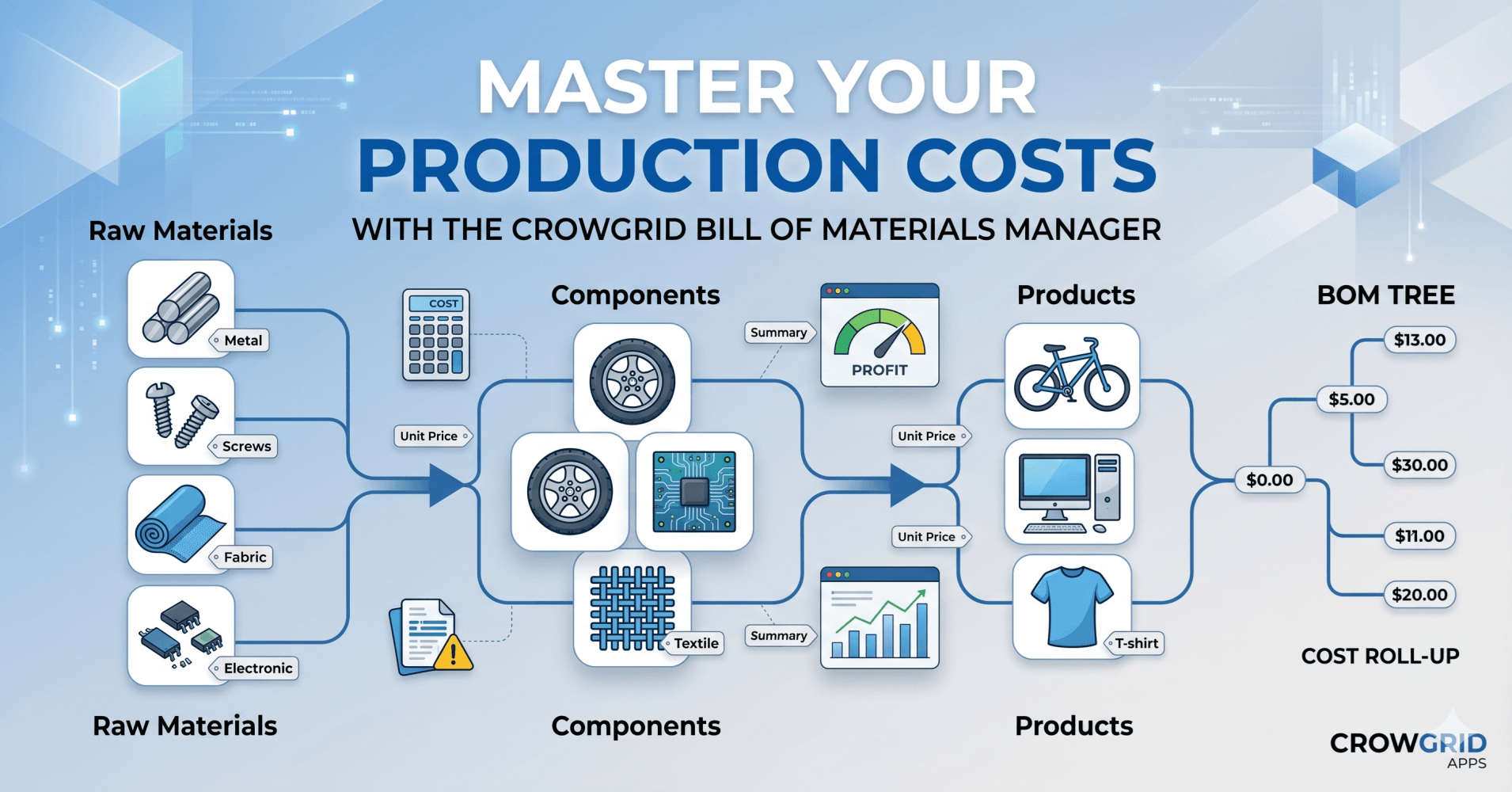
Master Your Production Costs with Crowgrid's Bill of Materials (BOM) Manager
Whether you are designing a custom bicycle, assembling electronics, or manufacturing apparel, keeping track of every single part that goes into your final product is a complex challenge.
In the manufacturing and product development industry, managing a Bill of Materials (BOM) is standard practice. You take raw materials, assemble them into components, and combine those components into a final product. However, tracking the unit costs of these materials across different components—and calculating the final cost of a product—can quickly become a nightmare.
Traditionally, businesses try to solve this by either relying on error-prone, messy Excel spreadsheets or by investing heavily in clunky, over-complicated ERP (Enterprise Resource Planning) or MRP tools.
At Crowgrid, we believe there is a better way. Enter the Bill of Materials Manager—a streamlined, intuitive tool designed specifically to solve your BOM problems without the unnecessary bloat.
Let’s dive into how it works and how it can transform your cost tracking process.
The Core Concept: The 3-Tier BOM Architecture
To understand product costs accurately, you need a solid foundation. Our BOM Manager is built on the industry-standard 3-tier architecture:
- Raw Materials: The fundamental building blocks (e.g., steel, fabric, bolts).
- Components: Sub-assemblies built using various raw materials (e.g., a bicycle wheel made of a rim, spokes, and a tire).
- Products: The final, sellable item assembled from multiple components.
By structuring your data this way, the app automatically tracks where every single material is used and calculates how price fluctuations at the raw material level impact your final product's profit margin.
Inside the BOM Manager: A Step-by-Step Walkthrough
1. The Command Center: Dashboard
When you open your project, you are greeted by a clean, easy-to-navigate dashboard. It provides a bird's-eye view of your entire operation. You can instantly see how many raw materials, components, and products you have in your catalog, along with your total BOM value.
2. Building the Foundation: Raw Materials
Everything starts here. In the Raw Materials section, you create your "source-of-truth" catalog. You can easily add items, assign SKU codes, categorize them (e.g., Mechanical Parts, Textiles), and set their base unit prices.
Adding a new material takes just seconds. We also included a highly flexible unit system (pieces, meters, kilograms, etc.) so you can track inventory exactly how you buy it.
3. Assembling the Pieces: Components
Once your materials are in the system, you can start building Components. For example, if you are building a bike, you can create a "Wheels" component. Inside this component, you simply select the raw materials you added earlier (rims, tires, spokes) and specify the quantities. The tool instantly rolls up the cost to give you the total component price.
4. The Final Assembly: Products
The final step in the input flow is creating your Product. You select the components you’ve built, define how many of each are required, and the system does the rest.
Output & Analytics: Where the Magic Happens
Data entry is only useful if you get actionable insights out of it. We’ve designed two powerful reporting views to help you analyze your products.
The BOM Summary & Pricing Calculator
The BOM Summary provides a comprehensive cost roll-up for any selected product. You can see a beautiful visual breakdown of which components are driving your costs.
But it doesn't stop at tracking costs. We built a robust Pricing Calculator right into the summary page. You can:
- Enter a target sell price to instantly see your Profit, Margin, and Markup.
- View Margin Scenarios (e.g., "What should my sell price be if I want a 40% margin?").
- Get quick Cost Insights (identifying your biggest cost driver, most-used material, and highest unit price).
The BOM Tree Visualization
We know that manufacturing and engineering professionals process information visually. The BOM Tree gives you an interactive, hierarchical view of your product structure. You can expand and collapse branches to inspect exactly what goes into every level of your product. Both the BOM Summary and BOM Tree can be easily exported to PDF or as an image for your reports.
Tailored to Your Needs: Advanced Settings
Because businesses operate globally, the BOM Manager includes comprehensive regional and unit settings. You can easily adjust currency symbols, date formats, number formats, and toggle between Metric and Imperial measurement systems.
The Crowgrid Philosophy: Why Not Just Use an ERP?
When companies face BOM management issues, the traditional advice is "buy an ERP software." However, through our experience, we’ve identified three massive problems with this approach—which is exactly why Crowgrid exists.
- The Budget Trap: Enterprise tools are incredibly expensive. You are forced to allocate a massive budget just to get access to basic BOM features.
- The Steep Learning Curve: These systems are heavy, slow, and complicated. You don't just pay with money; you pay with your team's time trying to learn how to navigate archaic menus.
- The 80/20 Bloatware Problem: This is the ultimate "bonus" problem. You spend a fortune and waste hours training your team, only to realize that you don't even use 80% to 85% of the software's features.
Crowgrid's Value Proposition is simple: Stop paying for heavy, bloated software.
With tools like the Bill of Materials Manager, you get a highly specific, beautifully designed, and intuitive application that solves your exact problem without the unnecessary complexity. You save money, your team learns it in minutes, and you use 100% of the features you pay for.
Ready to take control of your product costs? Explore the Bill of Materials Manager and other targeted productivity tools today at Crowgrid.