Cash Flow Planner · browser app
See what is left after the bills.
Plan incoming and outgoing cash before the month arrives. Change a starting balance, add a payment, or ask AI to help with the same plan.
Start with the cash you have planned.
This is the starting amount before all planned movements. Later months also carry forward earlier movements.
Fictional example · two planned records
Planned closing balance
A projection from your entries; no bank connection or automatic reconciliation.
The trial is separate from your account, even when signed in. Saved guest data lasts up to 7 days in this browser. These are planned movements, not a live bank balance.
Preparing your browser plan…
New blank or example plan
A new plan keeps the current saved plan. The 3-plan guest limit still applies.
01 / Planned record
A payment once. A bill every month.
Edit a real record to change its amount or choose daily, weekly or monthly recurrence. The next months use the same native schedule calculation.
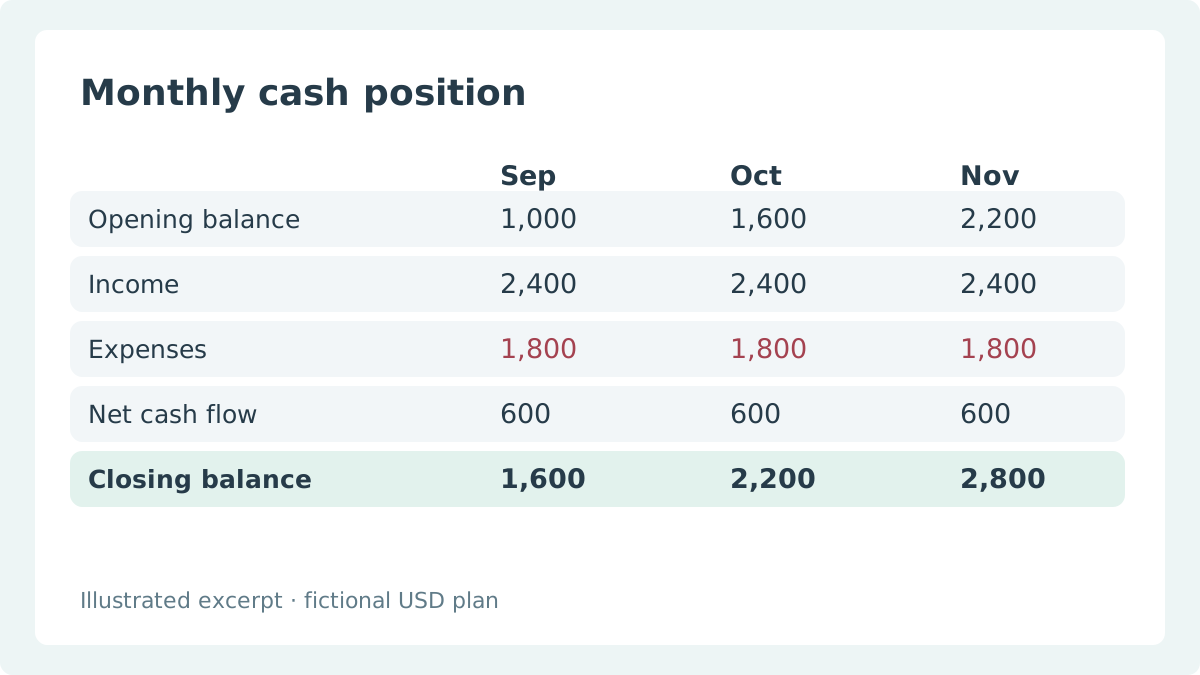
This month and the next two
| Review month | Month opening | Planned income | Planned expenses | Planned closing balance |
|---|
A projection from your entries; no bank connection or automatic reconciliation.
02 / AI Assistant
Describe the change. Check the effect.
Ask the real Cash Flow assistant to explain this plan or prepare a change. Review and edit the proposal before Apply; the nearby figures use the same browser plan.
Try asking why cash changes next month, or ask for a recurring expense with an amount and dates.
Preparing your browser plan…
Take the plan with you.
Save and continue with this same plan ID. The full app adds monthly tables, transaction logs and dashboards. Sign-in uses the existing transfer and account-limit checks; it does not guarantee a saved account copy until the transfer succeeds.
Real AI assistant
Ask about your plan, review a proposed edit, then apply it. AI usage is limited.
One-time & recurring
Daily, weekly or monthly, with an interval and optional end date.
Monthly balances
Opening, income, expenses, net movement and closing from the native schedule.
Transaction log
Trace the dated occurrences generated from your input records.
Categories & currency
Manage these in the full app; currency display does not convert exchange rates.
Excel & visual export · Pro
Excel import/export and dashboard PNG/PDF require this app’s Pro plan.
Free
Free to start planning.
3 plans · 25 input records per plan
$0.00Cash Flow Planner Pro
Cash Flow Planner Pro: unlimited plans and records, Excel import/export and dashboard PNG/PDF export.
$9.95 / month · $99.50 / year
USD · monthly or annual billing · Pro applies to this app; AI usage limits still apply.
Open the full app Crowgrid
We build focused, single-purpose tools that do one thing well. No bloat, no complexity—just clarity and simplicity.
Prefer planning in Excel?
Someka’s Cash Flow Planner is the spreadsheet source. Its 500-record and 366-day limits are separate from this browser app.