How Crowgrid Cash Flow Planner Works: Ditch the Excel Chaos
Tired of overly complex ERPs and messy Excel sheets? Discover how Crowgrid Cash Flow Planner helps small businesses and startups manage cash flow simply and efficiently.
Let’s be honest: Managing cash flow shouldn't require a PhD in finance.
If you are a small business owner, a startup founder, or a freelancer, you've probably faced this exact dilemma: You need to know what your financial runway looks like for the next few months, but your options are terrible. You either drown in a messy, error-prone Excel spreadsheet, or you pay a fortune for a massive enterprise ERP system where you end up using only 5% of the features.
The learning curve is too steep, and the tools are simply overkill.
That’s exactly why we built the Crowgrid Cash Flow Planner. It’s a fast, simple, and affordable tool designed specifically to solve one problem flawlessly: giving you clear visibility into your incoming and outgoing money.
In this post, we’ll walk you through exactly how it works and how you can get started in minutes.
The Core Concept: Simplicity by Design
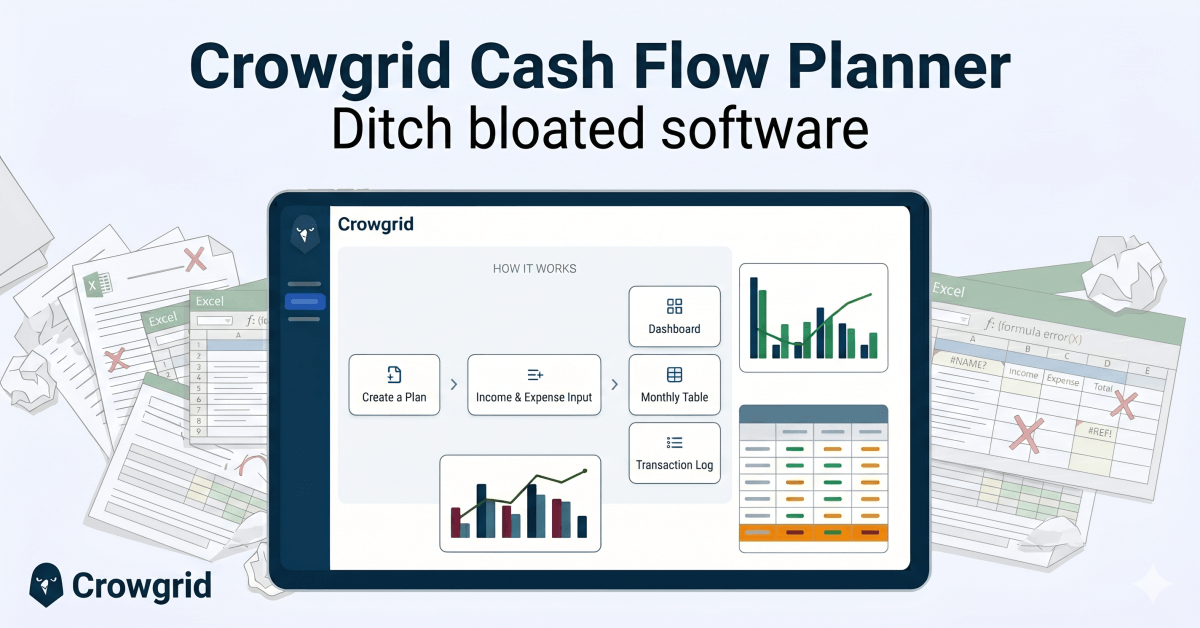
Before diving into the app, here is the high-level logic of how the Crowgrid Cash Flow Planner operates. We stripped away the unnecessary fluff and focused on a clean, logical workflow:
- Create a Plan: Think of this as opening a new folder or file.
- Income & Expense Input: You enter your expected financial records.
- Automated Outputs: The system instantly generates a visual Dashboard, a detailed Monthly Table, and a sequential Transaction Log.
Let’s look at each step in detail.
Step 1: Creating Your First Plan
In Crowgrid, an instance of your financial data is simply called a Plan. You can create multiple plans—for example, one for your main company, one for a side project, or different scenario forecasts (best-case vs. worst-case).
When you start a new plan, you don't have to stare at a blank screen.
You can:
- Start Blank: If you want to build from the ground up.
- Start with Sample Data: (Highly Recommended) This populates the app with realistic example records. It's the best way to play around with the app, see how the charts react, and understand the flow before entering your own numbers.
- Duplicate Existing: Perfect if you want to clone an existing plan to test a new financial scenario without ruining your original data.
Step 2: The Heart of the App - Adding Records
The magic happens in the Records section. This is where you input your expected cash flow items. The interface is clean and tabular, making data entry as easy as a spreadsheet, but much smarter.
Adding a record is incredibly straightforward. When you click + Add Record, you define a few simple parameters:
- Record Type & Category: Is it Income or Expense? (e.g., Sales Revenue, Operating Expenses).
- Amount: How much is it?
- Entry Type (The Game Changer): This is where the app saves you hours of work. You choose whether the transaction is One-Time or Recurring.
- One-Time: Just pick the date it happens.
- Recurring: Set it to repeat daily, weekly, monthly, or customized (like every 3 months). You set a Start Date, and optionally, an End Date. (Pro tip: If you don't set an end date, the system will automatically project it forward based on your default settings!)
Once you enter your records, you are done with the hard part. The app takes over from here.
Step 3: Analyzing Your Cash Flow
Now that your data is in, it’s time to see the big picture. Crowgrid Cash Flow Planner gives you three distinct ways to analyze your financial future.
1. The Dashboard (For the Visual Thinker)
If you want to know the health of your business at a glance, the Dashboard is your home base.
Here, you get a beautiful, auto-generated overview of your year. You can track your opening and closing balances, net cash flow, and see your income vs. expenses mapped out on a clear bar chart with a trend line. It also highlights your top income and expense categories, showing you exactly where your money is coming from and where it’s going.
2. The Monthly Table (For the Numbers Person)
Accountants and finance professionals love this view. It is a rolling 12-month breakdown of your cash flow.
Instead of scrolling through endless data, you get a clean grid showing exactly how much is expected to come in and go out month by month. It calculates your monthly cash balance automatically, helping you spot potential cash shortages months before they happen.
3. The Transaction Log (The Future Timeline)
Because you created "Recurring" records, you might wonder, "What exactly am I paying for on January 15th next year?"
The Transaction Log answers this. It is an automatically generated, read-only list of every single cash flow occurrence, sorted chronologically. It unfolds all your recurring rules into a clear timeline. You can look ahead to any date and see exactly which transactions are scheduled to hit your bank account.
Fully Customizable to Your Needs
Every business is different, so we made sure the app adapts to you through a very simple Settings menu.
- General Settings: Set your local Currency, choose your preferred Date Format, and configure Number Formats. You also define your Opening Balance here, which serves as the starting point for all your forecasts. You can also set how long recurring items should continue if you didn't give them an end date.
- Categories: Don't like our default categories? No problem. You can add, edit, or delete Income and Expense categories to match your specific business model perfectly.
- Data Management: Want to start fresh? You can clear all data instantly or load sample data if you need a sandbox to play in. Exporting and importing your data to Excel is also supported seamlessly.
Why Choose Crowgrid Cash Flow Planner?
The market is full of financial apps, but most of them get it wrong for small businesses. They are built for massive corporations with dedicated finance teams.
Crowgrid Cash Flow Planner is different:
- Zero Learning Curve: You don't need tutorials. If you've ever used a computer folder or a basic spreadsheet, you already know how to use it.
- No "Overkill" Features: We don't charge you for complex accounting modules you will never use. It does cash flow, and it does it perfectly.
- Accessible to Everyone: It’s incredibly affordable, and you can even try it out on our generous free tier right now.
Ready to stop stressing over Excel formulas and get clear visibility into your business's future?