How Small Teams Track Employee Certifications Without a Full LMS
Not every employee training problem requires a full LMS. For many small teams, the real challenge is tracking who completed which training, when certifications expire, and what needs attention next.
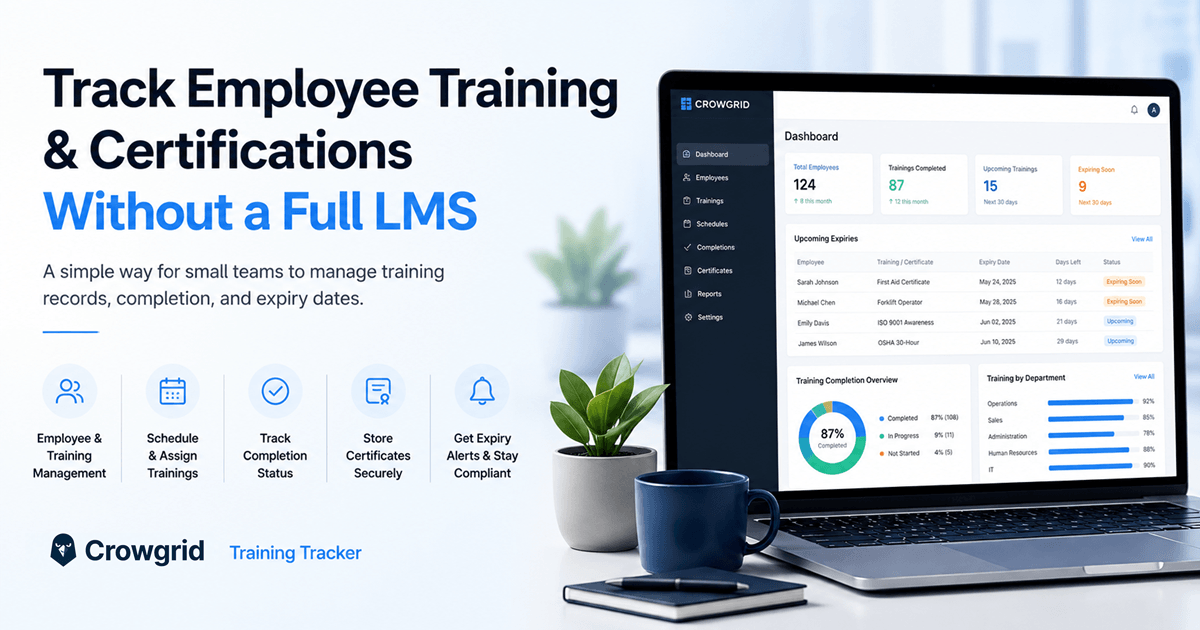
Not every employee training problem requires a full learning management system.
For many small teams, the real challenge is simpler:
Who completed which training? Who missed it? Which certifications are about to expire? What needs to be renewed before it becomes a compliance problem?
That is not always a content delivery problem.
Very often, it is a tracking problem.
A full LMS can be useful when a company needs to host courses, assign online lessons, run quizzes, manage learning paths, and deliver training content at scale.
But many teams do not need all of that.
They already know which trainings they want to assign. Some trainings happen in person. Some are provided by external instructors. Some are required annually. Some create certificates that need to be stored and renewed.
In those cases, the hard part is not “how do we deliver a course?”
The hard part is:
how do we keep the whole training process organized?
Why companies track employee training in the first place
Employee training is not only about compliance.
Companies also provide training because they want employees to grow, stay engaged, improve their skills, and move forward in their careers.
That training can include many different topics:
- sales training
- communication training
- Excel training
- coding training
- safety training
- onboarding training
- certification-based training
- role-specific operational training
- soft-skill development
Larger companies often have formal HR budgets for this. But even smaller companies may organize a few trainings each year for different teams.
And someone has to manage the process.
Usually, that person is not trying to build a full learning platform.
They may be an HR specialist, HR manager, operations person, office manager, or department coordinator.
Their responsibility is more practical:
- define which trainings exist
- decide who should attend
- schedule the training
- track who attended
- track who missed it
- collect feedback or ratings
- store certificates
- know when renewals are needed
That is why employee training management often becomes a structured tracking workflow.
Not a full e-learning project.
Why a full LMS can be too much
A learning management system can be powerful.
But power comes with setup.
A typical LMS may require:
- user management
- course setup
- training content upload
- permission configuration
- onboarding users into the system
- learning how the platform works
- integrations
- subscription costs
- administration time
For a large company with thousands of employees and a dedicated learning team, that can make sense.
For a smaller team, it can be excessive.
A company may simply have 50 or 100 employees and run a few trainings per year. Not every employee attends every training. Some trainings are required only for specific departments or roles.
In that situation, the question becomes very simple:
Do we really need a full LMS just to track this?
Often, the answer is no.
The two biggest problems are usually:
cost and learning curve.
You pay for the system. Then you spend time setting it up. Then your team has to learn it.
And the worst part is: after all that cost, setup, and effort, many teams still end up using only a small part of the product.
They do not need the whole platform.
They need a clear way to track employee training.
Why many teams still use spreadsheets
Because a spreadsheet is easy to start.
You open Excel or Google Sheets. You create columns. You list employees. You list trainings. You add completion dates, scores, notes, and certificate information.
For a small number of employees and a small number of trainings, that can work.
There is nothing wrong with using a spreadsheet at the beginning.
Spreadsheets are flexible. They are familiar. They are fast.
But training tracking does not stay simple forever.
As soon as the process grows, the spreadsheet starts carrying more responsibility than it was designed for.
You may need to track:
- multiple departments
- multiple locations
- different training types
- different completion statuses
- renewal dates
- certificate files
- feedback scores
- missed trainings
- upcoming sessions
- recurring annual requirements
At that point, the spreadsheet is no longer just a simple list.
It becomes a fragile training management system.
Where spreadsheets start breaking down
The biggest issue is not entering the data.
The issue is maintaining the process.
A spreadsheet works like digital paper. You can write information into it, filter it, sort it, and update it manually.
But a real tracking system should do more than store rows.
It should help you notice what needs attention.
For example:
- a certification is about to expire
- an employee has not completed required training
- a scheduled training is coming up
- a department has low completion
- a certificate file is missing
- a renewal needs to be assigned
A spreadsheet usually does not tell you these things unless someone actively checks it.
That creates risk.
Someone has to remember to open the file. Someone has to filter the right rows. Someone has to check dates manually. Someone has to send reminders.
That may be fine for a few records.
But it becomes annoying and risky when the list grows.
There are also collaboration problems:
- different people may update different versions
- it may not be clear who changed what
- Excel files are passed around by email
- local files become outdated
- Google Sheets can work, but still needs manual structure
- multi-location teams can easily lose consistency
If one location updates a file and sends it back, what happens next?
Does HR merge it manually?
Does everyone use the same structure?
Who owns the final version?
This is where training tracking becomes messy.
Certification expiry is a different kind of pain
Training completion is one thing.
Certification expiry is another.
Some trainings are not just “completed once.”
They expire.
That means the company needs to know:
- when the certificate was issued
- when it expires
- who needs renewal
- whether the renewed certificate was uploaded
- whether the employee is still compliant
This matters especially in areas like:
- safety training
- healthcare training
- food safety
- equipment operation
- ISO-related requirements
- internal compliance training
- regulated operational workflows
The risk is simple:
A certificate expires, nobody notices, and the company finds out too late.
Maybe during an audit.
Maybe during an inspection.
Maybe when a customer, regulator, or internal manager asks for proof.
At that moment, the problem is no longer just “data organization.”
It becomes an operational risk.
A good tracker should help avoid that.
It should not only store the expiry date. It should make upcoming renewals visible.
Ideally, it should help HR or operations teams see what is coming before it becomes urgent.
What a lightweight training tracker should include
A small team does not always need a full LMS.
But it does need more structure than a spreadsheet.
A lightweight employee training tracker should include the essentials:
- employee list
- training list
- training schedule
- assigned employees
- completion status
- completion date
- certificate upload
- expiry or renewal date
- upcoming renewals
- simple dashboard
- calendar view
- export options
The purpose is not to replace every LMS feature.
The purpose is to manage the real workflow clearly.
You should be able to answer questions like:
- Which employees completed this training?
- Who still needs to attend?
- Which trainings are scheduled soon?
- Which certificates are expiring?
- Which department is behind?
- Which trainings received low feedback?
- Which records should be exported for reporting?
That is the practical layer many small teams actually need.
The middle ground: not a spreadsheet, not a full LMS
This is the gap Crowgrid is designed for.
A spreadsheet is easy to start but becomes fragile.
A full LMS is powerful but often too heavy.
Crowgrid’s Employee Training Tracker sits in the middle.
It is not a learning management system.
It does not try to host your entire training academy.
It is a browser-native training tracker built for teams that need to manage:
- training records
- employee assignments
- schedules
- completion tracking
- certification status
- renewal dates
- training visibility
Because it runs in the browser, the workflow is easier to access across devices.
You can use it from a desktop, laptop, tablet, or phone. You are not tied to one local spreadsheet file. You do not need to pass versions around. You do not need to rebuild the same structure manually.
The goal is simple:
start quickly, track clearly, and avoid unnecessary software complexity.
When should you use a full LMS?
A full LMS may be the right choice if you need to:
- host online courses
- build learning paths
- run quizzes or exams
- deliver video lessons
- manage thousands of learners
- integrate learning with HR systems
- create a formal training portal
If that is your real need, an LMS can make sense.
But if your main problem is tracking training records, schedules, certifications, renewals, and completion status, a full LMS may be more than you need.
In that case, a focused training tracker may be a better fit.
Final thought
Employee training is important.
But managing it should not require a huge software implementation every time.
For many small teams, the real need is practical:
- know which trainings exist
- assign them to employees
- track who completed them
- store certificates
- monitor expiry dates
- stay ready for audits or internal reviews
That workflow needs structure.
But it does not always need a full LMS.
Crowgrid’s Employee Training Tracker is built for that middle ground: more organized than a spreadsheet, lighter than a large training platform, and focused on the tracking work teams actually need to manage.